 Gmail Exporter
Export your Gmail to a spreadsheet in one click
Extract, filter and back up your entire inbox to CSV, Excel or JSON — without leaving Gmail. Remove duplicates, analyze senders and download exactly what you need in seconds.
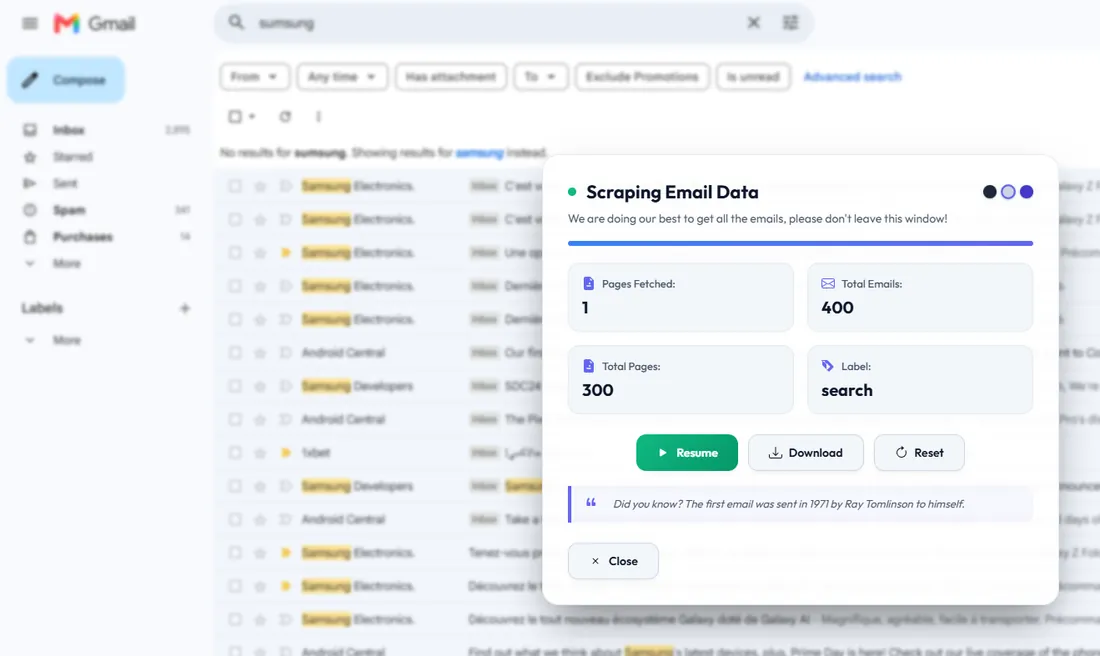
Everything you need to tame your inbox
A lightweight extension that turns messy Gmail threads into clean, structured data — ready for spreadsheets, CRMs and analysis.
1-Click Export
Export your entire visible email list to a spreadsheet instantly. No copy-pasting, no manual selection — just click and download.
Duplicate Removal
Detect and strip out duplicate rows automatically before exporting, so your contact lists stay clean and reliable.
Smart Filters
Apply custom filters by sender, subject, date or keyword right inside the panel and export only what matters.
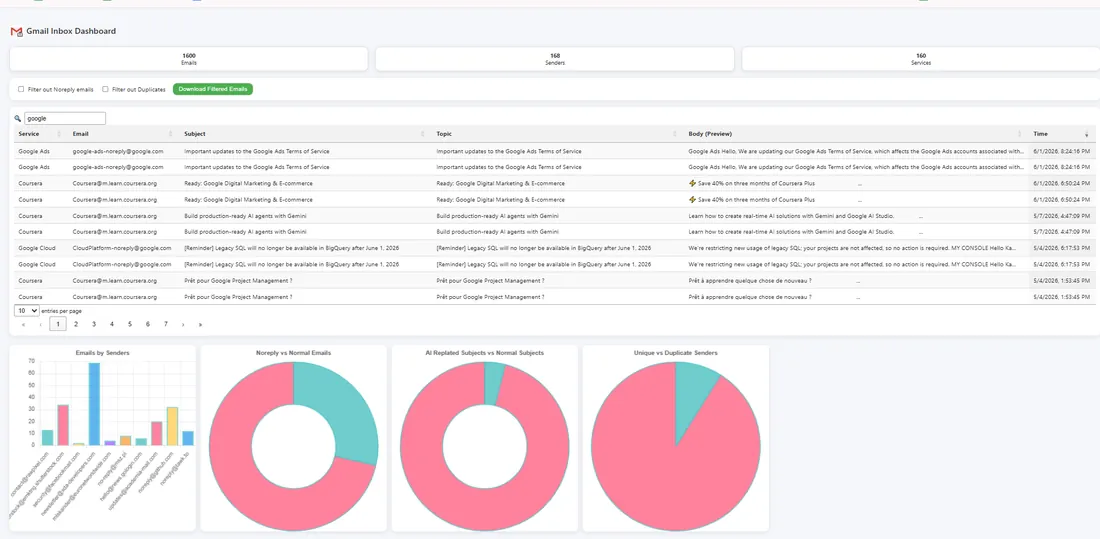
Inbox Analytics
Run quick checks on your lists — top senders, counts and patterns — without leaving your inbox.
CSV · Excel · JSON
Export to the format you actually use. Open directly in Google Sheets, Excel or feed it straight into your tools.
Private by Design
Everything runs locally in your browser. Your emails are never uploaded, stored or shared with anyone.
From inbox to spreadsheet in 3 steps
No tutorials, no setup. If you can open Gmail, you can export it.
Add to Chrome
Install the free extension from the Chrome Web Store in one click. No account or credit card required.
Open Gmail & filter
Pin the extension, open your inbox or a label, and apply any filters you like. Remove duplicates with one click.
Export & download
Choose CSV, Excel or JSON and hit export. Your file lands on your computer, ready to use anywhere.
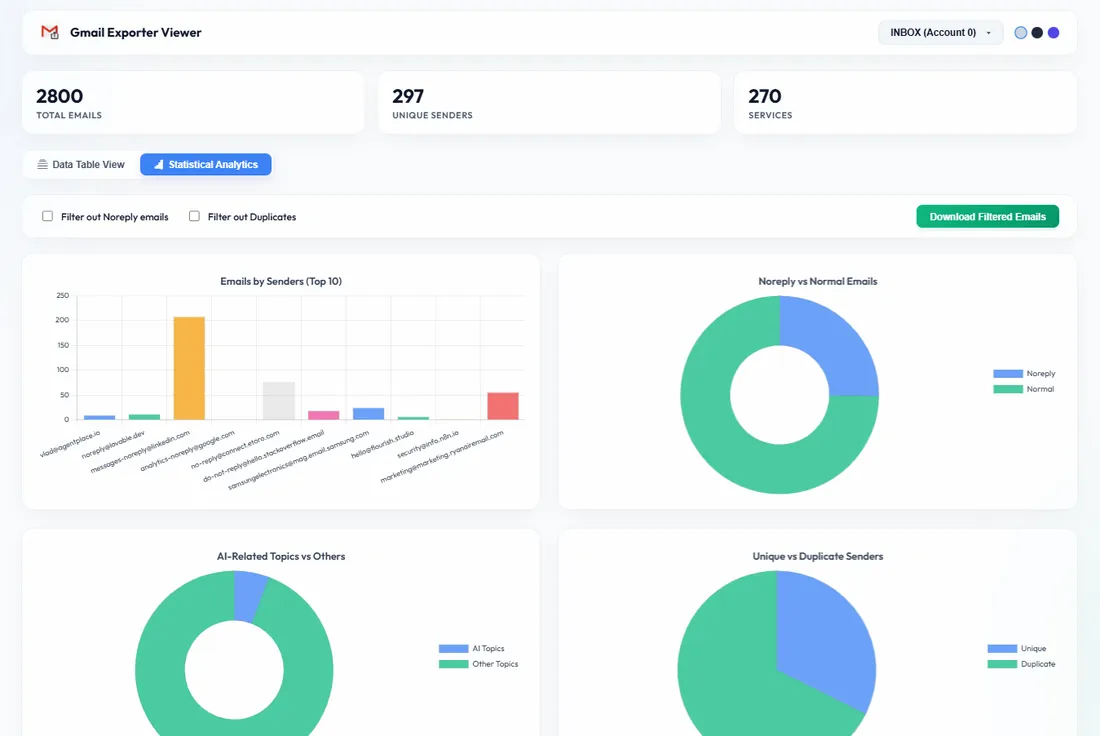
Filter and de-duplicate without leaving Gmail
Stop exporting messy lists. Apply custom filters to your email lists and remove duplicates with a single click — directly inside your browser, before anything is downloaded.
- Custom filters by sender, subject, keyword or date
- One-click duplicate removal
- Preview before you export
Turn your inbox into clean, usable data
Export exactly what you need to CSV, Excel or JSON and open it in Google Sheets, Excel or any tool you already use. Perfect for backups, reporting, lead lists and migrations.
- CSV, Excel (XLSX) and JSON formats
- Extract sender names & email addresses
- Opens instantly in Sheets & Excel
Built for everyone who lives in Gmail
Whatever you do with email, exporting it cleanly makes it easier.
Sales & outreach
Pull lead lists and contact emails into your CRM in minutes.
Marketers
Build clean, de-duplicated lists for campaigns and reporting.
Backups
Archive important inbox data safely as a spreadsheet you own.
Migrations
Move data out of Gmail when switching accounts or tools.
Finance & ops
Export receipts, invoices and notifications for record-keeping.
Researchers
Collect and analyze email datasets in your favorite tools.
Developers
Grab structured JSON to plug into scripts and pipelines.
Everyone else
Just want your emails in a spreadsheet? One click away.
Manual export vs. Gmail Emails Exporter
Google Takeout gives you a giant archive. We give you a clean spreadsheet — in seconds.
| What you want | Manual / Takeout | Gmail Exporter |
|---|---|---|
| Time to export | Hours & waiting | Seconds |
| Output format | MBOX archive | CSV · Excel · JSON |
| Remove duplicates | ✗ Manual | ✓ 1 click |
| Filter before export | ✗ | ✓ |
| Opens in Sheets/Excel | ✗ Needs conversion | ✓ Instantly |
| Stays in your browser | — | ✓ 100% local |
| Price | Free | Free |
Your inbox stays yours
We built this extension to be private first. Your data never touches our servers.
Runs locally
All processing happens inside your own Gmail tab. Exports are generated and saved directly on your device.
No data collection
We don't store, transmit or sell your emails. There's no backend reading your inbox — ever.
No account needed
No sign-up, no password, no credit card. Install it and you're exporting in under a minute.
People save hours every week
“Exactly what I needed. I pulled 2,000 contacts into a CSV for our CRM in seconds. The duplicate removal alone is worth it.”
“I tried Takeout and gave up — this just worked. Clicked once, got a clean spreadsheet, done. Super lightweight.”
“Love that it runs in the browser and doesn't send anything anywhere. Perfect for backing up important emails.”
Pay once. Own it forever.
Exporting your emails is free, forever. Upgrade once — no subscriptions — to unlock contact details, dates and attachments.
- Everything in Starter
- Dates & direction (sent/received)
- Names & phone numbers
- Deduplicated Contacts sheet
- Export to Excel & JSON
- Everything in Pro
- Download attachments (ZIP)
- Export all folders at once
- Inbox analytics dashboard
- Everything in Business
- Multiple Gmail accounts
- No limits
- Priority support
Secure checkout via Stripe · 7-day money-back guarantee
Questions, answered
Is Gmail Emails Exporter free? +
Is my data safe and private? +
What formats can I export to? +
Can it remove duplicate emails? +
Do I need to sign up or add a credit card? +
Which browsers does it work on? +
Start exporting your Gmail in one click
Join thousands of people who turned their inbox into clean, usable data — for free.
Add to Chrome — It's Free Free forever · No sign-up · 100% private · Support development